Recently in one of the projects involving SharePoint 2013, AppFabric and Windows Workflow 4.5 we faced an interesting issue while installing\configuring AppFabric. Every time the installer would run for a while and then error out with the following message:
“AppFabric installation failed because installer MSI returned with error code: 1603”
Here is the screenshot for the same
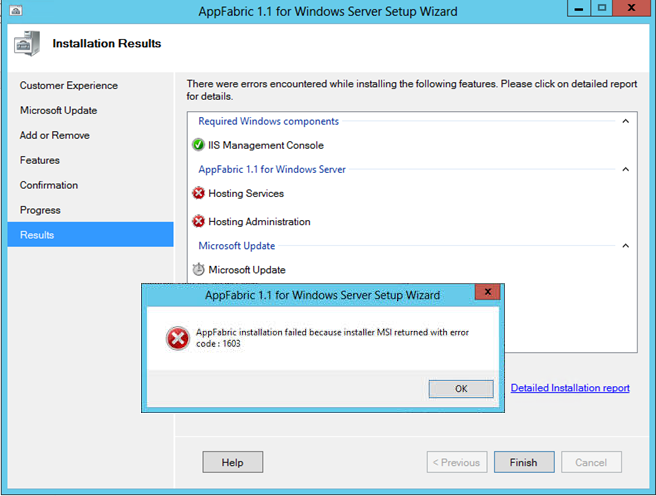
There are some good articles out there around how to resolve the issue. They have worked for some folks, but unfortunately did not for us.
Following are some of them, just in case it works for you:
– http://jefferytay.wordpress.com
The blogs listed above and similar blogs on these lines are talking about ensuring the pre-requisites are met and the PSModulePath variable is set correctly, and they have worked for quite a few people. Unfortunately, we had a slightly different issue at hand and in spite of ensuring that the couple points were taken care of, the installer would simply not go past that error.
Digging further into the logs that were generated post the error message, it turns out that the issue was with the two AD groups, AS_Administrators and AS_Observers being present already; maybe from a previous attempt. This was causing the installer to error out since it was not being able to create these AD groups. We deleted these two groups and then ran the installer again and yup it worked like a charm this time!
One of those moments when you sit back and say…
Man! Why didn’t I think about this before? 
 WePlus Consultancy
pingback…
http://blogs.agreeya.com/Lists/Posts/Post.aspx?ID=32
Deleting the AS_Observers group…worked for me…
Thanks for the information. See detailed description here https://msdn.microsoft.com/en-us/library/ff637696(v=azure.10).aspx
but still I didnt found these groups and I still continued to get this error.
This worked for us. Removing the AS_Observers group after failing of the installation of Appfabric. During the first install, we didn’t have ISS and/or .Net 3.5 installed.
Where can i search for the AS_Observers group?
I am facing the same problem and not able to find the groups. Please help.
@Lucifer you should be able to find them under computer management, groups and users.
Removing the AS_Observers group worked for me as well.
After hours of struggling, it was AS_Observers that was the culprit. Thanks!