Design philosophy and design systems/languages have now tremendously transformed the way we build next-gen front ends. But still, it is a complicated scenario for brands to evaluate whether their existing UI development approach is effective and cohesive, or they should revamp it to architect innovative and futuristic customer experiences.
Every time you integrate a new UI component or presentation layer, you add more complexity to the code or the overall solution architecture. This leads to more chaos. For example, your reusable UI or code components are available in multiple sources, but lack of governance model makes it difficult to iterate them effectively. Eventually, your design or development iterations could become directionless and fragmented. Shipping new features or capabilities start taking a longer time than expected. Your app’s bootup time, render speed, or memory consumption degrades— adversely impacting your brand experience.
Ultimately, you reach a point where silos between development and design become so huge that fixing the UI components in bits and pieces no longer helpful, or you may have to consider ‘system redesign’ from scratch.
What are options to increase your overall UX/UI quality, consistency, and speed?
Should we choose to refactor things from scratch and drown in the plethora of npm/bower packages while trying to ensure the latest design trends and principals are in place? Or should we use one of the modern design systems instead? The answer is obvious, but the decision-making process demands a lot of serious thought. Here we are talking about couple of modern design systems, which we see users compare often. Be informed though, we will be taking a Microsoft dev’s point of view.
Before we do that though, let us look at some highlights that the Modern Design Systems offer. There primary goal is to resolve the legacy design challenges by bringing order to chaos. They provide you more structured and guided way to build solutions for your UI challenges. The purpose of these design systems is to not only facilitate presentation layer design and development, but also ensure the best possible UX for apps built on these platforms. Following are some common traits and capabilities which enable a superior outcome with the least amount of time investment:
- Modularity: Create design assets and code components with no dependencies.
- Composability: Combine design assets and code components to build new patterns.
- Diversity: Handle multiple design use cases with minimal duplication efforts
- Flexibility: Update and extend code components/functions in a variety of contexts.
- Accessibility: Ensure WCAG compliance and other rules for greater accessibility.
- Scalability: Share common, approved design assets and code components with productivity and UI consistency.
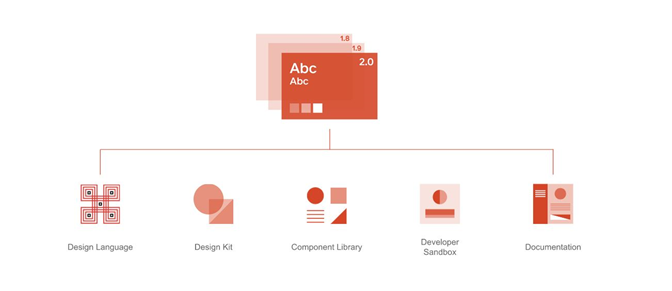
Apart from the two Design Systems we will be touching upon next, many leading brands are already innovating in design experience by launching some of the most sophisticated design systems conducive for their line of services & product offerings. Some of the notable platforms such as Apple’s Human Interface Guidelines, IBM’s Design System, Salesforce Lightning Design System, and Atlassian’s Design System have done phenomenal work in the area. They may not fit your requirements entirely, but you can always take inspiration and learnings from their design thinking, philosophy, and guiding principles to infuse more creativity and innovation in your UI/UX initiatives.
Material Design
In 2014, Google tried to change the design approach the way we interact with apps with the introduction of Material Design concept.
Its Material Design System focuses on effectively utilizing available space and provide a consistent experience across web, mobile/tabs, or big screens. Google has shared ‘Material Design’ system that is being followed by many industry verticals in the design world.
With Material Design, you create a single underlying system to unify the user experience. You can extend Material’s visual language for innovation and creative brand appeal. You can directly download design component sources file along with resources and demos on components and theming to create awesome apps.
Fluent Design System
In 2017, Microsoft released Fluent Design concept. It, like Material Design, carries physical elements to the digital plane, but permits a range of materials. The design system is centered around five key components: Light, Depth, Motion, Material, and Scale. It infuses more prominent use of motion, depth, and translucency effects.
Fluent Design seems the next level of the Material Design. Microsoft is looking to accommodate rich, immersive experiences across devices, including in iOS and Android via apps.
Bojana Ostojic, principal design manager in the Windows devices group said, “We’re going from a flat design language … into the immersive, multidimensional one. We’re going from small screen and touch to now appreciate the full range of devices and input types, and we’re moving beyond just consumption and communication into also creativity and curation.”
Microsoft’s ecosystem of design tools and components can be utilized to create a consistent vision across Web, Windows, iOS, and Android platforms.
Future Scenarios and Compatibility
The rapid innovation in virtual assistants, 3D/4D, augmented reality, and virtual reality are broadening the spectrum of experience designer’s concerns.
Google Material Design focuses on providing more flexibility for designers to create custom “themes” with varying geometry, colors, and typography.
Microsoft Fluent UI is more than a collection of UX frameworks for creating web and mobile apps that share code, design, and interaction behavior. It expands the idea of material and adds new dimensions into the UI.
The most exciting thing about Fluent UI is its cross-platform libraries, and components usages such as: Fluent UI React (web), Fluent UI Apple (iOS and macOS), and Fluent UI Android GitHub libraries that ensure more intuitive and coherent applications across platforms. The best example is Microsoft 365 apps that works amazingly across Android, iOS/macOS, and Web. Now, Microsoft usages Fluent UI functionalities across Word, Excel, MS Teams, and PowerBI. With the recent addition of Fluent UI React Native library, it is now easier to build cross-platform components— empowering JavaScript developers to deliver exceptional experiences across devices without potential incompatibilities issues.
Moreover, Fluent Design Systems support the usages of UWP features such as Pen interactions, Windows Ink, and touch controls in your existing WPF, Windows Forms, and C++ desktop applications. It can be used to build immersive experiences in MR—specifically, a HoloLens app that allows non-verbal children to communicate via pictograms.
According to Kevin Gallo, Microsoft’s VP for the Windows Developer Platform, “Fluent is meant to work well everywhere — including in VR — and support touch, gaze, and pen input. “Material [Design] doesn’t even come close to thinking about that world.”
Fluent’s UX components are used by hundreds of developers and millions of consumers every day. That is an encouraging push for a business point of view to:
- Create experiences that are accessible to people with a wide range of physical abilities
- Improve collaboration amongst designers and developers for quality, consistency, and speed
- Deliver outcomes with greater accessibility, internationalization, and performance
- Play the longer game: design not just for today but also for future
As the future of digital experience is going to be more sensory, simulated, virtual, mixed-reality based, what other design systems you think are going to be contributing to the design revolution? Do share your thoughts with us.
 WePlus Consultancy