Another one of those instances where SharePoint keeps us on our toes.
Had to try something in SharePoint 2013 and was setting up a quick new VM environment. After the OS setup, ran the prerequisites and bumped into this error – The tool was unable to install Application Server Role, Web Server (IIS) Role.
Had been through this one before, and if I recall it right, individual\manual install got me through then. But today, that approach didn’t work!!!
Quickly did some research again and got some threads leading in the following directions
- Manual Install via the Server Manager
- Using PowerShell to mimic the prerequisites (roles\features) install
- Offline installation
- Even a hotfix install
More details can be found from this MS article here. Obviously, didn’t get through in any of those hence the blog…the solution I found was kind of…different.
Here, take a look at the screenshot showing few lines from the error log.
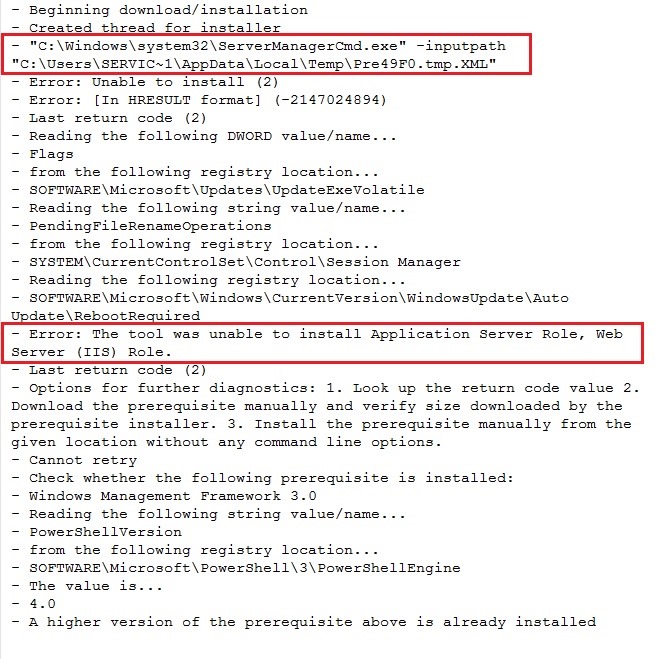
Even before we get the actual error, it is complaining about something else and fails earlier…highlighted in red.
It turns out, in the “C:\windows\system32” directory there is no file by the name “ServerManagerCmd.exe”, it’s “ServerManager.exe”…it’s the executable to load the server manager. Once the Root Cause Analysis was compete, the solution was simple…just copy the original file and rename it, add the extra “cmd” in there and it worked just fine.
 WePlus Consultancy
ping-back: http://blogs.agreeya.com/Lists/Posts/Post.aspx?ID=36